

You can get your business financial records under control in a single day by following a six-step plan and protecting a recurring "money date" on your calendar. The IRS requires a recordkeeping system that summarizes transactions in journals and ledgers, with all supporting documents kept as proof for tax returns and audits. QuickBooks handles most of that structure automatically once it's set up correctly. If you'd rather hand the whole thing off, Amcfo's bookkeeping and fractional CFO services can take it from a standing start to audit-ready.
Start today with these six steps:
- Open a dedicated business checking account and credit card so personal and business transactions never mix
- Capture every receipt digitally the day it happens (phone photo, QuickBooks receipt capture, or a dedicated scanning app)
- Pick one storage method: cloud-based accounting software, a structured local folder system, or both with an offsite backup
- Schedule a weekly "money date" to code transactions and match receipts to ledger entries
- Reconcile your bank and credit card statements at the end of every month before closing the books
- Back up all records to at least two locations, one of which is offsite or cloud-based
Table of Contents
- Which financial records does your small business need to keep?
- Where should you store your business financial records?
- How should you name and organize your financial files?
- What does a weekly and monthly money date routine look like?
- How long do you need to keep different types of records?
- How do you protect financial records from loss, theft, and fraud?
- When should you hire bookkeeping or fractional CFO help?
- A 7-step checklist to get organized this week
- What compliance requirements go beyond IRS guidelines?
- Key Takeaways
- The part most guides skip: bookkeeping is not the same as financial management
- Amcfo can take your records from disorganized to audit-ready
- Useful sources and further reading
Which financial records does your small business need to keep?
The IRS is clear that your recordkeeping system must show gross income, deductions, and credits, and it must be backed by supporting documents. A bank statement alone does not satisfy that standard. Your journals and ledgers are the primary evidence; the supporting documents prove each line.
Here are the core categories every small business should maintain:
Gross receipts and sales records. Cash register tapes, bank deposit slips, receipt books, invoices, and credit card charge slips. These establish your total income and are the first thing an auditor checks.
Expense receipts and invoices. Canceled checks, account statements, credit card receipts, and vendor invoices. Each document should tie directly to a ledger entry. Without the receipt, the deduction is at risk.
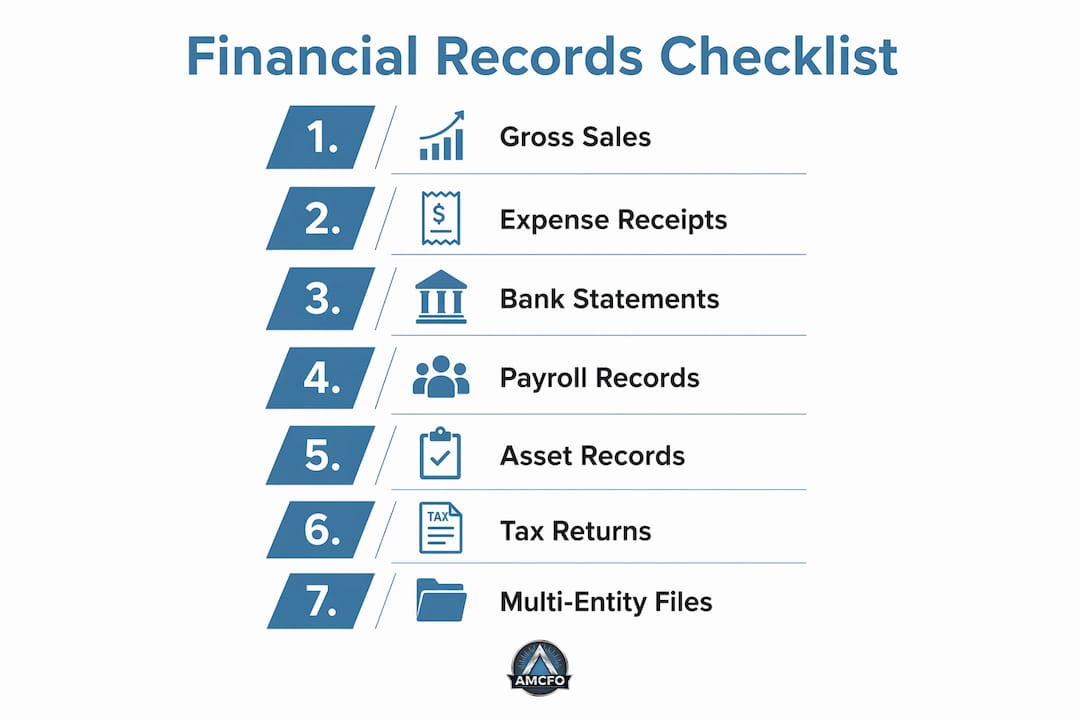
Bank and credit card statements. Monthly statements for every business account. These are your reconciliation anchors and catch duplicate charges, fraud, and coding errors.
Payroll records. Amounts and dates of each payment, employee names and addresses, Social Security numbers, W-4 forms, copies of W-2s, and records of any payroll tax deposits. Payroll is one of the most audit-sensitive areas for small businesses.
Asset purchase and depreciation records. Purchase price, date placed in service, Section 179 elections, depreciation schedules, and sale or disposal records. You need these for as long as you own the asset and for several years after you sell it.
Tax returns and supporting schedules. Copies of every filed federal and state return, plus the worksheets and schedules that support each line. These are your baseline for any future amended return or audit.
Multi-entity owners face an additional layer: IRS guidance requires a complete and separate set of records for each legal entity. Commingling records across two LLCs or a corporation and a sole proprietorship creates immediate audit exposure. Inventory businesses also need periodic physical counts tied to their cost-of-goods-sold calculations.
Where should you store your business financial records?
Physical filing cabinets work, but they fail the moment there's a fire, flood, or office move. Local digital storage is faster to search but vulnerable to hard-drive failure. Cloud-based accounting software solves both problems and adds real-time access from anywhere.
Physical storage
- Pro: No software dependency, no subscription cost
- Con: Slow to search, vulnerable to physical damage, hard to share with accountants remotely
Local digital storage (folders on a computer or server)
- Pro: Fast access, no internet required
- Con: Single point of failure without a backup, not accessible to remote bookkeepers
Cloud accounting software (QuickBooks Online, for example)
- Pro: Bank feeds pull transactions automatically, receipts attach directly to transactions, accountant access is a single permission toggle
- Con: Monthly subscription cost, requires reliable internet
The IRS specifies that electronic storage systems must be able to index, store, preserve, retrieve, and reproduce records in a legible format, and the agency may test your system. Before you destroy paper originals after scanning them, run a retrieval test and document the results. If your electronic system cannot reproduce a legible copy on demand, keep the paper.
For backups, the 3-2-1 rule is the practical standard: one primary copy in your accounting software, one local backup (external drive or server), and one offsite copy (cloud storage or a separate cloud backup service). Test your restore process at least quarterly. A backup you have never tested is not a backup.

Pro Tip: QuickBooks Online lets you attach a photo of a receipt directly to a transaction. Do it at the point of purchase and you eliminate the "where did I put that receipt?" problem entirely.
How should you name and organize your financial files?
A consistent folder structure cuts the time to find any document from minutes to seconds. It also means a new bookkeeper or auditor can navigate your records without a guided tour.

A practical folder tree looks like this:
Business Records/
  2026/
    Income/
      CustomerName/
        Invoice_2026-03-01_0001.pdf
    Expenses/
      VendorName/
        Receipt_2026-03-15_OfficeSupplies.pdf
    Payroll/
      2026-Q1_PayrollSummary.pdf
    Bank Statements/
      Checking_2026-03.pdf
    Tax/
      2026_FederalReturn.pdf
The file-naming template that works across every category: YYYY-MM-DD_DocumentType_VendorOrCustomer_ReferenceNumber.pdf. The date at the front means files sort chronologically by default. The document type tells you what it is at a glance. The reference number ties it back to the ledger entry.
Four rules that make this stick:
- One file per transaction. Never bundle multiple receipts into one PDF.
- Use the same template every time, no exceptions for "quick" saves.
- If your software supports a notes field on the file, add the chart-of-accounts code there.
- In QuickBooks, link the attached document to the specific transaction so the audit trail is complete.
Electronic invoices from vendors often arrive as email PDFs. Set up a dedicated email folder or rule to auto-collect them, then process them into your folder structure during your weekly money date. The goal is zero loose documents by the end of each week.
What does a weekly and monthly money date routine look like?
Sporadic bookkeeping is the single biggest driver of year-end tax surprises and cash-flow blind spots. A recurring "money date" turns recordkeeping from a crisis into a habit. Industry advisors consistently recommend a scheduled weekly or monthly review over ad hoc catch-ups, and the reason is simple: small errors caught weekly take five minutes to fix; the same errors caught in December take hours.
Weekly money date routine:
- Open your accounting software and pull in the bank feed for the week.
- Match each transaction to a receipt or invoice.
- Code any uncoded expenses to the correct chart-of-accounts category.
- Flag any transactions you cannot identify for follow-up before they age.
- Check your accounts receivable aging report for invoices past due.
Monthly close checklist (done within five business days of month-end):
- Reconcile every bank account and credit card to the statement balance.
- Review accounts payable for any bills due in the next 30 days.
- Run a profit-and-loss report and compare it to the prior month and your budget.
- Confirm payroll records match your payroll provider's reports (Paychex, for example, generates detailed payroll summaries that should tie to your general ledger).
- Note any exceptions, unusual transactions, or missing documents and resolve them before closing the month.
- Save a PDF of the reconciled bank statement and the month-end P&L to your records folder.
Common errors to watch for: uncoded transactions sitting in a suspense account, duplicate expenses from both a credit card feed and a manually entered bill, and cash sales that never made it into the system. Automation rules in QuickBooks can pre-code recurring vendors automatically, which cuts manual coding by a significant margin on high-transaction accounts.
Pro Tip: Block the money date on your calendar as a recurring appointment and treat it like a money date routine. Assign it to a specific person if you have staff. The regular time you spend weekly saves hours at tax time.
How long do you need to keep different types of records?
The IRS retention guidance ties the minimum holding period to the statute of limitations on your tax return. The general rule is three years from the date you filed, but several situations extend that window significantly.
| Record Type | Suggested Retention | IRS Rationale |
|---|---|---|
| Most tax returns and supporting documents | 3 years | Standard audit statute of limitations |
| Returns where income was underreported | 6 years | Extended statute for substantial omissions |
| Returns with bad-debt deductions or worthless securities | 7 years | Longer statute for these specific claims |
| Employment and payroll tax records | 4 years after tax due or paid | IRS payroll audit window |
| Asset purchase and depreciation records | Life of asset plus 3–7 years after disposal | Needed for gain/loss calculations on sale |
| Permanent records (corporate formation, deeds, major contracts) | Indefinitely | No statute of limitations on certain fraud claims |
The practical takeaway: when in doubt, keep it longer. Storage is cheap; a missing document during an audit is not.
For secure disposal, shred physical documents rather than recycling them. For digital files, use a secure-delete tool rather than moving files to the trash. Keep an index of what you destroyed and when, even after the documents are gone. That index itself has no sensitive data but proves you had a compliant retention policy.
State requirements often exceed IRS minimums. California, for example, has its own employment tax audit windows and sales tax record requirements that can push retention periods beyond the federal standard. Industry-specific rules add another layer: healthcare businesses face HIPAA record requirements, and government contractors must follow FAR retention schedules. When your business operates in a regulated industry or multiple states, confirm the applicable requirements with a tax professional rather than relying on federal minimums alone.
How do you protect financial records from loss, theft, and fraud?
Good records are only as valuable as they are secure. A single compromised accounting login can expose years of financial data and give a bad actor the ability to alter transaction history.
Essential controls checklist:
- Role-based access: Give each user in QuickBooks only the permissions they need. A sales rep does not need access to payroll records; a bookkeeper does not need the ability to delete transactions.
- Strong passwords and MFA: Enable multi-factor authentication on your accounting software, cloud storage, and email. A weak password on the email account that receives vendor invoices is a fraud risk.
- Least-privilege principle: Review user permissions quarterly. Former employees and contractors should be removed immediately upon departure.
- Encrypted backups: Cloud backups should use AES-256 encryption at rest. Local backups on an external drive should be encrypted before storage.
- Segregation of duties: The person who approves payments should not be the same person who records them. Even in a two-person office, splitting these roles reduces fraud risk.
- Bank reconciliation spot checks: Run an unannounced reconciliation mid-month occasionally. Fraud often shows up in the gap between scheduled reviews.
For accountant access, QuickBooks Online's "accountant user" role lets your bookkeeper or CPA log in with their own credentials. Never share your owner login. That separation keeps your audit trail clean and limits what any single user can access or modify.
Quarterly access review (15 minutes):
- Pull the user list from your accounting software.
- Confirm each active user still needs access and at the correct permission level.
- Remove or downgrade any stale accounts.
- Document the review date and who conducted it.
When should you hire bookkeeping or fractional CFO help?
Software handles the mechanics of small business bookkeeping, but software does not make decisions. The distinction matters: bookkeeping collects accurate data, while financial management uses that data for budgeting, cash flow, and strategic planning. Many small business owners conflate the two and end up with clean books but no visibility into where the business is actually headed.
Decision criteria for software:
- Transaction volume under 100/month: a simple spreadsheet or entry-level software may suffice
- Invoicing, payroll, and bank feeds needed: QuickBooks Online or a comparable platform
- Multiple entities, inventory, or job costing: mid-tier or industry-specific software
- Real-time cash visibility needed: integrated accounting software with live bank feeds is the standard recommendation
Signals that it's time to hire:
- Payroll is late or miscalculated more than once
- You cannot answer "what's my cash balance in 30 days?" without a spreadsheet scramble
- Month-end close takes more than a week
- You discovered a reconciliation error that had been sitting undetected for months
- Tax prep requires your accountant to reconstruct records from scratch
Service tiers map to different needs. A bookkeeping retainer keeps your records current and your reconciliations done. A QuickBooks setup or cleanup engagement gets your chart of accounts right and eliminates the backlog. Payroll management removes the compliance risk from your plate entirely. A fractional CFO goes further: budgeting, forecasting, cash-flow modeling, and the strategic layer that turns accurate books into confident business decisions.
The right entry point depends on where your biggest pain is. If records are a mess, start with a cleanup. If records are clean but you lack forward-looking visibility, a fractional CFO engagement is the faster path to strategic financial guidance.
A 7-step checklist to get organized this week
This plan assumes you are starting from a disorganized state. Each step has a realistic time estimate. If your time is limited, do steps 1 through 3 first; the rest can follow in subsequent weeks.
-
Open a dedicated business bank account (1–2 hours): If you are commingling personal and business funds, stop today. Call your bank or open an account online. This is the single highest-leverage action you can take.
-
Consolidate all receipts and documents (1–3 hours): Gather paper receipts, email invoices, and any digital files scattered across downloads folders. Put everything in one physical pile or one "unsorted" digital folder.
-
Pick and configure your accounting software (2–4 hours): QuickBooks Online setup includes connecting bank feeds, setting up your chart of accounts, and inviting your accountant. If your existing QuickBooks file is a mess, a cleanup engagement is faster than starting over manually.
-
Build your folder structure (30–60 minutes): Create the year/category/vendor hierarchy described earlier. Do it once; maintain it forever.
-
Digitize critical documents (2–4 hours for the current year; schedule prior years in phases): Scan current-year receipts and invoices first. For legacy paper records, scan the most recent three years of tax returns and supporting documents as a priority, then work backward in phases. Use a scanner with OCR (optical character recognition) so files are searchable, not just images.
-
Complete an initial reconciliation (1–3 hours): Match your bank statement to your accounting software for the most recent closed month. Note every discrepancy. This gives you a clean starting point.
-
Set your recurring money date (15 minutes to schedule): Block 30–45 minutes every week and 60–90 minutes at month-end. Assign it. Protect it.
For owners with legacy paper records going back many years: scan only what you are legally required to keep (see the retention table above) and shred the rest after confirming the retention period has passed. A phased approach over 90 days is more realistic than trying to digitize a decade of records in a weekend.
What compliance requirements go beyond IRS guidelines?
Federal IRS rules set the floor, not the ceiling. Depending on your state, industry, and business structure, you may face additional recordkeeping obligations that are stricter or more specific.
State-level requirements vary significantly. Most states have their own income tax audit statutes, sales tax record requirements, and employment tax rules. California's Franchise Tax Board, for instance, has its own audit authority independent of the IRS, and its statute of limitations on income tax assessments can differ from the federal window. States with sales tax (which is most of them) typically require you to keep sales records, exemption certificates, and resale certificates for three to five years, sometimes longer.
Industry-specific standards add another layer. Healthcare businesses must comply with HIPAA, which includes specific requirements for financial records tied to patient billing. Government contractors follow Federal Acquisition Regulation (FAR) Part 4, which mandates retention of contract-related records for three years after final payment, with longer windows for certain cost-type contracts. Financial services firms face SEC and FINRA recordkeeping rules that go well beyond what the IRS requires.
Entity structure matters too. Corporations and LLCs are generally required by state law to maintain minutes, resolutions, and financial records as part of their corporate governance obligations. Sole proprietors face fewer formal requirements but still need to meet IRS and state tax standards.
The practical implication: treat IRS guidance as your baseline and then layer on state and industry requirements. If you operate in multiple states or a regulated industry, a tax professional or compliance advisor should review your retention policy at least once. The cost of that review is trivial compared to the cost of a records-related penalty.
Key Takeaways
Organized financial records require a consistent filing structure, a recurring review routine, and retention periods aligned with IRS guidance — all three working together prevent audit exposure and give you real visibility into your business.
| Point | Details |
|---|---|
| Separate records from day one | Keep distinct journals, ledgers, and bank accounts for each legal entity to avoid audit exposure. |
| Use the money date routine | A weekly 30-minute and monthly 60-minute review catches errors before they compound and keeps books current. |
| Follow IRS retention windows | Most returns: 3 years; payroll: 4 years; bad-debt deductions: 7 years; asset records: life of asset plus disposal period. |
| Keep electronic records IRS-accessible | Your electronic storage must index, retrieve, and reproduce legible records on demand; test it before destroying paper originals. |
| Amcfo handles the full stack | Amcfo offers QuickBooks setup, monthly bookkeeping, payroll management, and fractional CFO services for businesses that need outside support. |
The part most guides skip: bookkeeping is not the same as financial management
Most articles on this topic treat organized records as the finish line. They are not. Clean, current books are the starting point for something more useful: knowing where your business is going, not just where it has been.
The owners I see struggle most are not the ones with messy records. They are the ones with reasonably clean books who have never connected those records to a forward-looking cash-flow model or a budget with real teeth. They know their revenue last month; they do not know whether they can afford to hire someone next quarter. That gap is where a lot of small businesses stall.
The "money date" routine described in this article is not just a bookkeeping habit. Done right, it is a 30-minute weekly window where you are actually running your business financially, not just recording what already happened. The owners who protect that time consistently tend to catch cash-flow problems weeks earlier, make payroll decisions with more confidence, and spend far less time in reactive mode at year-end.
There is also a real difference between upgrading your software and actually using it. A more feature-rich accounting platform does nothing if the reconciliations are still three months behind. A simple system used consistently beats a sophisticated one used sporadically, every time. Start with the habit; upgrade the tools when the habit is solid.
For businesses that have grown past the point where DIY bookkeeping is realistic, the right move is not just hiring a bookkeeper. It is understanding what bookkeeping versus accounting actually covers, and then deciding whether you also need the strategic layer that a fractional CFO provides. Those are different services solving different problems, and conflating them leads to either overpaying or underserving the business.
Amcfo can take your records from disorganized to audit-ready
If any of the "when to hire" signals in this article sound familiar — late reconciliations, a QuickBooks file that nobody trusts, cash-flow surprises at month-end — Amcfo's team can fix the foundation and keep it current.

Amcfo's accounting and bookkeeping services cover QuickBooks setup and cleanup, monthly bookkeeping retainers, and payroll coordination. A typical engagement starts with a diagnostic review of your current records, a prioritized remediation list, and a clear scope for ongoing work. For businesses that need more than clean books, Amcfo's fractional CFO services add budgeting, forecasting, cash-flow modeling, and strategic financial guidance on a retainer that scales with your needs. No full-time CFO salary required. To see the full range of service packages and pricing options, visit Amcfo's service and accounting packages page or schedule a consultation directly.
Useful sources and further reading
IRS guidance (compliance and retention):
- IRS: What kind of records should I keep? — the primary IRS page on record categories, journals, and ledgers. Start here for federal compliance.
- IRS: How should I record my business transactions? — covers the journal and ledger requirements and the role of supporting documents.
- IRS Publication 583: Starting a Business and Keeping Records — the most detailed IRS source on retention periods, electronic storage requirements, and multi-entity rules. Download and keep it.
Practical setup and tools:
- U.S. Small Business Administration: Manage your finances — practical SBA guidance on financial management for small businesses, including cash flow and recordkeeping basics.
- Amcfo: Accounting and Bookkeeping Services — service details for businesses that need QuickBooks setup, cleanup, or ongoing bookkeeping support.
- Amcfo: Fractional CFO Services — for businesses ready to move from recordkeeping to strategic financial planning.