

You can switch payroll providers with minimal disruption if you plan the timing, secure full payroll records, run at least one parallel payroll, and confirm who files transition-quarter taxes. The immediate next step: request a full payroll register and tax deposit history from your current provider and pick a tentative go-live date. Everything else in the process builds off those two moves.
TL;DR:
- Switching payroll providers at year-end or quarter-end simplifies year-to-date reporting and reduces risks associated with partial-year data transfer.
- Clarify who is responsible for filing transition-quarter taxes, and document all deposits and filings to prevent discrepancies during the switch.
- Ensure comprehensive data exports include payroll journals, tax records, employee identifiers, and benefit mappings, and run parallel cycles to reconcile discrepancies.
- Assemble a team with clear roles (finance, HR, IT, vendor liaison, executive sponsor) to manage communication, support, and troubleshooting during transition.
- Consider outside support, such as a fractional CFO, for complex switches to minimize errors, ensure compliance, and accelerate stabilization after go-live.
Table of Contents
- How Do You Switch Payroll Providers Step by Step?
- When Is the Best Time to Switch Payroll Providers?
- What Data Do You Need to Migrate and Test?
- Who Should Be on Your Payroll Migration Team?
- What Should You Check on the First Live Payroll Run?
- When Does It Make Sense to Bring in Outside Payroll Support?
- How Amcfo Supports a Payroll Provider Switch
- Sources
How Do You Switch Payroll Providers Step by Step?
Moving payroll systems fails for one of two reasons: missing data or missing agreements. Get both locked down early and the rest is largely execution.
- Evaluate your needs and schedule demos. List what's broken with your current setup (reporting gaps, tax errors, poor support) and use that list to screen new vendors. Get written proposals that spell out implementation timelines, data migration support, and total first-year cost.
- Review your current contract before you commit to anything. Look for notice periods, early termination fees, and data-export clauses. Many providers require 30 to 60 days' written notice, and some charge a fee for pulling historical reports after cancellation.
- Time your overlap carefully. Keep your old account active long enough to export everything you need. Canceling too early is the single most avoidable mistake in this whole process.
- Request full data exports. At minimum: payroll registers, tax deposit records, W-2 and 1099 history, year-to-date wages, deduction schedules, and any vendor or bank account numbers tied to direct deposit.
- Get implementation details in writing. Confirm exactly what the new provider handles: data import, field mapping, parallel testing, and who's responsible if something breaks during the switch.
- Run a parallel payroll cycle. Process one pay period in both systems and reconcile every line before you cut over for real.
A few things are easy to overlook in the middle of that list:
- Confirm whether your new provider assigns a dedicated implementation contact or routes you through a general queue.
- Ask what happens to historical reporting access once you cancel; some vendors lock you out immediately.
- Check integration points with time-tracking or benefits platforms before go-live, not after.
Pro Tip: Ask your outgoing provider for a "termination checklist" before you give notice. Most have one, and it tells you exactly what data becomes inaccessible and when. Get it in writing, not a verbal promise from a support rep.
When Is the Best Time to Switch Payroll Providers?
Timing determines how messy this gets. Switching at the end of a calendar year or the end of a quarter is lower risk because year-end reporting periods already produce clean year-to-date totals. Your new provider starts with a blank slate instead of inheriting partial-year wage data.
Mid-year and mid-quarter switches carry real complications:
- You have to transfer partial year-to-date wages accurately, or W-2s at year-end will be wrong.
- Someone has to file Form 941 for the transition quarter, and both providers may assume the other is handling it.
- State and local tax deposits need to line up with whichever provider is filing that period.
Get written confirmation of exactly who files the transition quarter's returns before you go live via Palm Beach Payroll Processing Services. This single agreement prevents what payroll professionals call the quarterly tax gap, where both sides assume the other filed and nobody did. Keep copies of every deposit and filing from that quarter on your own systems, not just the vendor's portal.
Build in lead time for state and local employer account updates too. New electronic deposit enrollments with state agencies can take a few weeks to process, and you don't want that holding up a live payroll run.
What Data Do You Need to Migrate and Test?
Data migration is where good plans fall apart if nobody checks the details. Before you terminate your old account, request payroll journals, tax deposit receipts, benefit carrier account numbers, direct deposit bank files, and prior-year W-2/1099 data in full.
Specifically, verify:
- Payroll journals and payroll tax returns for the current year, plus prior year if you'll need it for amendments.
- Pay stubs and direct deposit files, matched against actual bank routing and account numbers.
- Benefit deduction mappings, including 401(k) contributions, HSA elections, and garnishment orders.
- Employee identifiers, including SSNs, hire dates, and pay rate history.
Mapping errors show up most often in deduction codes, differing pay-frequency setups, and retroactive pay adjustments that don't carry over cleanly. The American Payroll Association recommends parallel testing as the standard safeguard against exactly this kind of error.
Running parallel payroll means calculating one full pay cycle in both the old and new systems, then comparing net pay, tax withholdings, and employer tax liability line by line. Document every discrepancy you find.
Pro Tip: If discrepancies show up during the parallel run, freeze the live cutover until you've reconciled them. A delayed go-live is far cheaper than a payroll error that hits 50 employees' bank accounts on the same day.
Who Should Be on Your Payroll Migration Team?
A payroll switch touches more departments than most owners expect, and confusion between them is what generates a flood of employee questions during week one.
Build a team with these roles:
- Finance lead to own the budget, contract terms, and reconciliation sign-off.
- HR or benefits lead to manage deduction accuracy and employee-facing questions.
- IT support, if payroll integrates with time tracking or accounting software.
- A payroll implementation owner who manages the vendor relationship day-to-day.
- An executive sponsor who can unblock decisions quickly when something stalls.
Draft a communication timeline before you announce anything: what employees should expect on the first new paycheck, how to access new pay stub portals, and who to contact with questions. Coordinate directly with your 401(k) administrator and any garnishment agents to confirm deposits and data mapping continue without a gap. A short training session and a one-page job aid for HR staff ahead of go-live prevents most of the support tickets that would otherwise land on the finance lead's desk.
What Should You Check on the First Live Payroll Run?
The first live cycle is where theory meets reality. Before you process it, confirm ACH bank files are correctly formatted, tax settings match your entity's filing status, employee direct deposit accounts are accurate, and benefit deductions are mapped to the right vendors.
After the run processes:
- Verify every deposit actually posted to employee accounts, not just that the file was submitted.
- Compare total withholding amounts against what you expected based on the parallel run.
- Check for mis-mapped deductions, especially 401(k) and garnishment amounts.
Keep audit logs from this first cycle. Route every employee issue through one support contact instead of letting questions scatter across HR, finance, and the new vendor. Schedule a formal reconciliation meeting within 48 to 72 hours of go-live while the details are still fresh enough to trace.
When Does It Make Sense to Bring in Outside Payroll Support?
Some payroll switches are straightforward. Others involve multi-state tax registrations, a recent acquisition, or a finance team that's already stretched thin managing daily operations. That's when bringing in outside support changes the outcome, not just the workload.
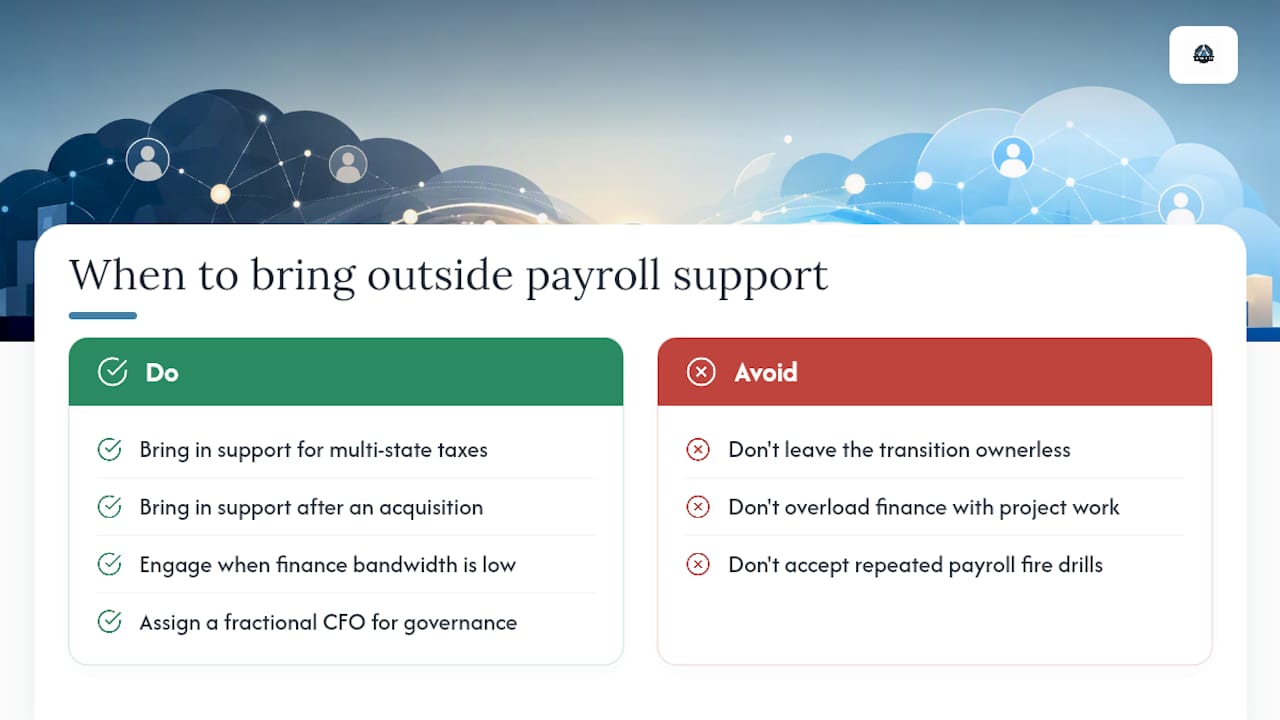
A fractional CFO brings project governance to a process that otherwise has no natural owner. Someone has to negotiate vendor terms, catch the tax-filing gap before it becomes a penalty, and hold the reconciliation process accountable when three departments are each convinced someone else is handling it. Internal teams often lack the bandwidth to do that on top of running the business.
The payoff shows up in specifics: fewer payroll errors on the first live cycle, a documented answer to who files what for the transition quarter, and a stabilization period measured in days rather than months. That's the difference between a payroll switch that quietly succeeds and one that generates a support fire drill every pay period for a quarter.
— Angelica
How Amcfo Supports a Payroll Provider Switch
Amcfo handles the parts of a payroll migration that trip up internal teams most: validating exported data before it moves, coordinating who files transition-quarter tax returns, running the parallel payroll comparison line by line, and staying through go-live to catch errors before they hit a paycheck.

You can bring Amcfo in for a single migration assessment, a fixed-scope project plan covering the full switch, or an ongoing monthly retainer if you want continued payroll oversight after go-live. Each option scales to how much internal capacity you actually have versus how much this transition needs. If you're weighing a provider change right now, start with Amcfo's accounting and bookkeeping services to schedule a payroll migration assessment and get a clear plan before you give notice to your current provider.
Sources
Before finalizing your switch, check current filing deadlines directly on IRS.gov, review calendar-year versus fiscal-year reporting rules through the IRS's own guidance, and browse the American Payroll Association's resource library for migration best practices. Amcfo's payroll support guide covers additional practical checklists.