

A QuickBooks cleanup restores reconciled accounts, accurate financial statements, and a repeatable monthly close, and the work protects real money decisions. Before touching anything, export your Trial Balance, Profit and Loss, and Balance Sheet as of today, back up the company file, and set a closing date (with a password if your version supports it). If you're more than 12 months behind on reconciliation or you have payroll and inventory tangled into the mess, consider professional help early instead of after extended frustration.
TL;DR:
- A QuickBooks cleanup requires a thorough audit of unreconciled accounts, a full backup, and synchronization of bank feeds to prevent repetitive errors.
- The process involves a specific 12-step workflow, starting with a pre-cleanup audit and ending with locking the books and exporting finalized reports.
- Costs vary from a few hundred dollars for small backlogs to several thousand for complex, multi-entity files, depending on the scope.
- Common recurring issues include duplicate feeds, inconsistent vendor mapping, and unchecked small errors that cause books to deteriorate over time.
- Implementing a monthly close checklist with clear review responsibilities is the best habit to prevent future cleanup needs.
Table of Contents
- What Is a QuickBooks Cleanup, Exactly?
- A Six-Item Quick Checklist You Can Finish Today
- The 12-Step QuickBooks Cleanup Workflow
- Which QuickBooks Tools Fix File Errors and Slow Performance?
- How Much Does a QuickBooks Cleanup Cost and How Long Does It Take?
- When Should You Hire a Professional Instead of DIY?
- Why Do QuickBooks Cleanups Keep Coming Back?
- How to Lock the Books and Finalize Your Cleanup
- What AmCFO Brings to a QuickBooks Cleanup
- The One Habit That Actually Prevents the Next Cleanup
- Get a QuickBooks Cleanup Quote From Amcfo
- Official QuickBooks Resources Worth Bookmarking
- Sources
What Is a QuickBooks Cleanup, Exactly?
A QuickBooks cleanup is the process of fixing everything in your file that keeps your financial statements from being trustworthy: unreconciled bank accounts, duplicate vendors, miscategorized expenses, orphaned Undeposited Funds, and a Chart of Accounts nobody has looked at since setup. The end result isn't just "tidier books." It's a set of financial statements you can hand to a lender, a buyer, or the IRS without flinching.
This differs from a QuickBooks setup, which builds the file structure from scratch, and from ongoing bookkeeping, which maintains a file that's already clean. Cleanup is the bridge between a broken file and a functioning one. QuickBooks' own guidance frames the work as a 12-step sequence that starts with a pre-cleanup audit and ends with locking the books and exporting final reports. That sequence matters more than people expect. Skip a step or do them out of order, and you end up recategorizing the same transactions twice.
A Six-Item Quick Checklist You Can Finish Today
Before you dig into a full cleanup, spend one to three hours protecting what you have and scoping the size of the problem. This is triage, not the fix itself.
- Export your Trial Balance, Balance Sheet, and P&L as of today and save them as PDFs outside QuickBooks.
- Set or confirm your closing date and apply a password if your QuickBooks version supports it, so nobody edits closed periods by accident.
- Back up the company file or export your QuickBooks Online reports to a secure folder, ideally cloud storage separate from your QuickBooks account.
- Identify your worst reconciliation gap. Pull up every bank and credit card account and flag whichever one has the largest unreconciled balance or the oldest unreconciled date.
- Pause new bank feed imports if they're actively creating duplicate transactions while you work.
- Gather 12 months of bank and credit card statements, plus the login credentials for every connected account, so nothing stalls the process later.
Pro Tip: Do the exports and backup first, even before you look at a single transaction. A cleanup gone wrong is recoverable if you have a clean snapshot from before you started. Without one, you're rebuilding from memory.
The 12-Step QuickBooks Cleanup Workflow
This is the order experienced bookkeepers actually use, not the order that feels intuitive. Working out of sequence is the single biggest reason cleanups take twice as long as they should.
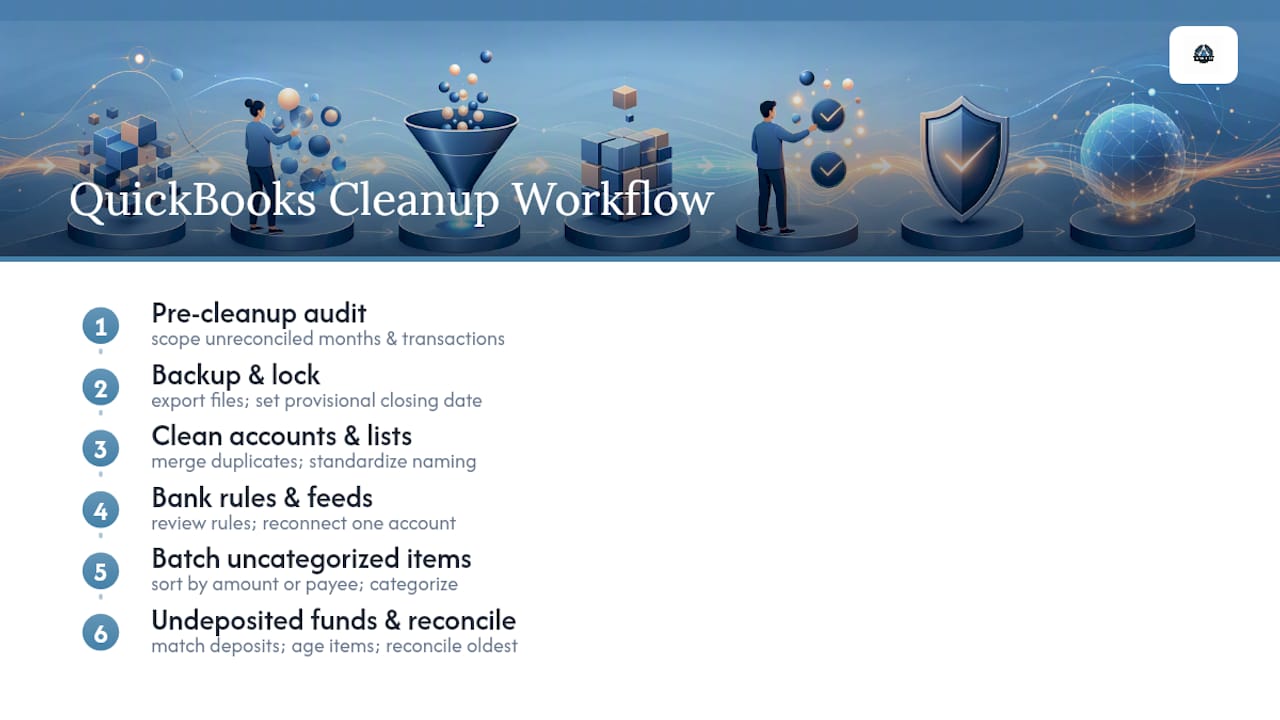
1. Run a pre-cleanup audit. Before fixing anything, figure out how many months are unreconciled, roughly how many transactions you're dealing with, and whether payroll or inventory adds complexity. This single step determines whether you're looking at a few hours of work or a few weeks. Practitioners with extensive experience cleaning many QuickBooks Online files treat this scoping step as non-negotiable, because guessing at scope is how flat-fee quotes turn into money-losing engagements.
2. Back up everything and lock what you can. Export a backup of the company file (Desktop) or full reports (Online), then set a provisional closing date even before you start editing. You can move it forward as you close periods.
3. Audit the Chart of Accounts. Look for duplicate accounts, accounts nobody has posted to in years, and inconsistent naming ("Office Supplies" vs. "Supplies, Office"). Merge duplicates, mark unused accounts inactive, and standardize naming conventions across the board. Doing this before mass recategorization matters more than it sounds. If you recategorize transactions into an account structure that later gets merged or renamed, you're redoing that work.
4. Merge duplicate vendors and items, and enforce naming rules. "Amazon," "Amazon.com," and "AMZN Mktp" are probably the same vendor split three ways. Merging them cleans up your vendor reports and makes 1099 tracking accurate.
5. Standardize bank rules and rebuild feeds carefully. If your bank feed has been creating duplicate transactions, don't just disconnect and reconnect blindly. Review existing bank rules first, fix the ones causing miscategorization, and reconnect one account at a time so you can catch duplicates as they appear rather than after 300 transactions have imported.
6. Clear Uncategorized Income, Uncategorized Expense, and "Ask My Accountant" in batches. Sort these by amount or by payee and work through them in groups rather than one at a time. Most of these transactions cluster around a handful of vendors or income sources, so batch categorization is faster and more consistent than transaction-by-transaction guessing.
7. Resolve Undeposited Funds and clearing-account issues. A growing, permanent Undeposited Funds balance almost always means deposits aren't being matched to the payments that created them. Age the items, match what you can to bank deposits, and investigate anything older than 60 to 90 days individually. A guide on Undeposited Funds cleanup and prevention walks through the matching workflow in more depth.
8. Reconcile accounts chronologically, oldest month first. Never skip around. Reconcile your earliest unreconciled month, resolve any adjustments with a documented memo, and only then move to the next month. This is the step most 12-step methodologies agree on as the one you cannot shortcut, because later months depend on earlier balances being correct. A breakdown of account reconciliation covers the documentation habits that keep this step audit-ready.
9. Tie loan and amortization schedules to the general ledger. Compare your loan balance in QuickBooks against the lender's amortization schedule. Also pull your sales tax liability report and compare it to what you've actually remitted; mismatches here tend to compound quietly for years.
10. Run a trial balance variance scan. Compare your current Trial Balance against a prior clean period (or your tax return, if one exists) and flag any account that moved in a way you can't explain. Tie your P&L to actual bank deposits and withdrawals, and if you carry inventory, check that your inventory valuation makes sense against a physical count or purchase history.
11. Lock the books and export final reports. Once reconciliations are complete and variances are explained, set your final closing date, apply the password, and export a clean Balance Sheet, P&L, Trial Balance, and General Ledger, along with every reconciliation report as a PDF.
12. Set close controls going forward. Build a monthly close checklist: reconcile every account, review uncategorized transactions, check for duplicate feed entries, and confirm the closing date moves forward each month.
Pro Tip: Document every adjustment as you make it, right in the transaction memo field. "Reclassified per bank statement, March 2025" takes ten seconds to type and saves an hour of guessing when someone (including future you) asks why a balance changed.
Which QuickBooks Tools Fix File Errors and Slow Performance?
QuickBooks ships several utilities built specifically for cleanup work, and knowing which one solves which problem saves hours of trial and error.
- QuickBooks Tool Hub → Quick Fix My File → File Doctor handles company file errors and network issues, including error codes like 6150 and 6000. The scan can take 10 to 15 minutes depending on file size, and it sometimes reports "unsuccessful" even after fixing the underlying problem, so don't panic at that message alone.
- Verify Data scans your company file for integrity issues without changing anything, which makes it safe to run anytime you suspect corruption.
- Rebuild Data actually repairs what Verify finds. Always create a backup first, since rebuilds sometimes need more than one pass, and re-run Verify afterward to confirm the fix held.
- Condense Data shrinks file size by stripping out audit trail detail on old transactions. It's irreversible and can remove edited or voided transaction history permanently, so reconcile everything and export final reports before you run it. Treat it as a last resort for performance problems, not a routine cleanup step.
If Verify keeps flagging the same error after multiple rebuild attempts, stop trying to force it. Document the specific error from the qbwin.log file and escalate to official QuickBooks support or a specialist rather than repeating a fix that isn't working.
How Much Does a QuickBooks Cleanup Cost and How Long Does It Take?
Price and timeline both scale with how far behind you are, not with how big your business is. A single-owner consultancy three months behind can cost more to fix than a 20-person company that's only missed one reconciliation.
- Small scope (a few months behind, low transaction volume, no payroll complexity): typically a few hundred dollars and a few hours to a couple of days of work.
- Moderate scope (6 to 12 months behind, moderate volume, some payroll or multiple bank accounts): usually several hundred to low thousands of dollars, spanning several days to two weeks.
- Complex scope (over a year behind, high transaction volume, inventory, multi-entity, or messy payroll history): often multiple thousands of dollars and multiple weeks of work.
What actually drives the number up: months behind, raw transaction volume, whether payroll or inventory is involved, missing source documents, and third-party integrations feeding data into QuickBooks. A provider that skips the diagnostic and quotes a flat number sight unseen is guessing. The better approach, common among practitioners who scope these projects regularly, is a short paid or free diagnostic phase that produces an actual transaction count and issue list before a fixed quote goes out. Expect deliverables that include a scoped project plan, a fixed price or hourly estimate, and a list of documents they'll need from you before starting.
When Should You Hire a Professional Instead of DIY?
Some signs mean stop, and call someone. If you've been unreconciled for an extended period, if payroll liability accounts don't match what you've actually paid the state and IRS, if you're seeing negative balances in accounts that should never go negative (like inventory or fixed assets), or if a lender or auditor is requesting clean statements urgently, DIY cleanup is a real risk to your timeline and your accuracy.
Before reaching out to a provider, do this triage yourself:
- Estimate roughly how many months are unreconciled across all accounts.
- List which specific accounts are affected (checking, savings, credit cards, loans).
- Gather the last 12 months of statements for every affected account.
- Note whether payroll, inventory, or multiple entities complicate the picture.
A solid intake conversation with a provider should ask for exactly this information upfront, plus read access to your QuickBooks file and a rough sense of your deadline (tax season, loan application, ownership change). A checklist for organizing financial records is a useful reference for pulling this together before that first call.
Pro Tip: If you're not sure whether your situation counts as "complex," count your bank and credit card accounts. Three or more active accounts with any reconciliation gaps almost always pushes a project into moderate or complex territory, even if the calendar gap looks small.
Why Do QuickBooks Cleanups Keep Coming Back?
Most repeat cleanups aren't caused by isolated mistakes. They're caused by structural problems left in place after the first fix, and failure pattern analysis across cleanup projects points to the same handful of culprits again and again.
- Duplicate bank feeds reimporting the same transactions after a reconnect. Fix: remove and rebuild feeds one account at a time, checking for duplicates before moving to the next.
- Poor or inconsistent mapping rules that categorize the same vendor differently depending on which rule fires first. Fix: consolidate overlapping rules and standardize vendor mapping across all accounts.
- A permanently growing Undeposited Funds balance that nobody ever clears. Fix: enforce a clearing-account workflow for every payment processor, matching deposits weekly rather than quarterly.
- Opening Balance Equity used as a dumping ground instead of being reclassified properly at setup. Fix: pull original source documents and reclass each entry to its correct equity or liability account.
- No monthly close process, so small errors accumulate silently for months. Fix: assign one person to run a close checklist every month, with a review gate before the period locks.
The fixes only hold if someone owns the review. A cleanup without a named reviewer tends to unravel within two or three months.
How to Lock the Books and Finalize Your Cleanup
Finishing a cleanup means producing proof, not just a clean-looking dashboard. Do this before calling the project done:
- Export and file the Balance Sheet, P&L, Trial Balance, General Ledger, and every reconciliation report as PDFs.
- Set the final closing date and apply a password so closed periods can't be edited without deliberate override.
- Attach a memo to every manual adjustment, referencing the source document that justified it.
- Build bank rules, recurring journal entries, and a written monthly close checklist with a clear exception-handling step for anything that doesn't reconcile cleanly.
That checklist is what separates a cleanup that sticks from one you'll be paying for again next year.
What AmCFO Brings to a QuickBooks Cleanup
QuickBooks cleanup is often handled as part of a broader bookkeeping and accounting service, which matters because a cleanup done in isolation, without a plan for what happens next month, tends to drift right back into the same mess. One recent engagement involved a services business that hadn't reconciled its primary operating account in over a year; reconciliation, Chart of Accounts cleanup, and a documented close process turned a file nobody trusted into one the owner used to secure financing within weeks.
The One Habit That Actually Prevents the Next Cleanup
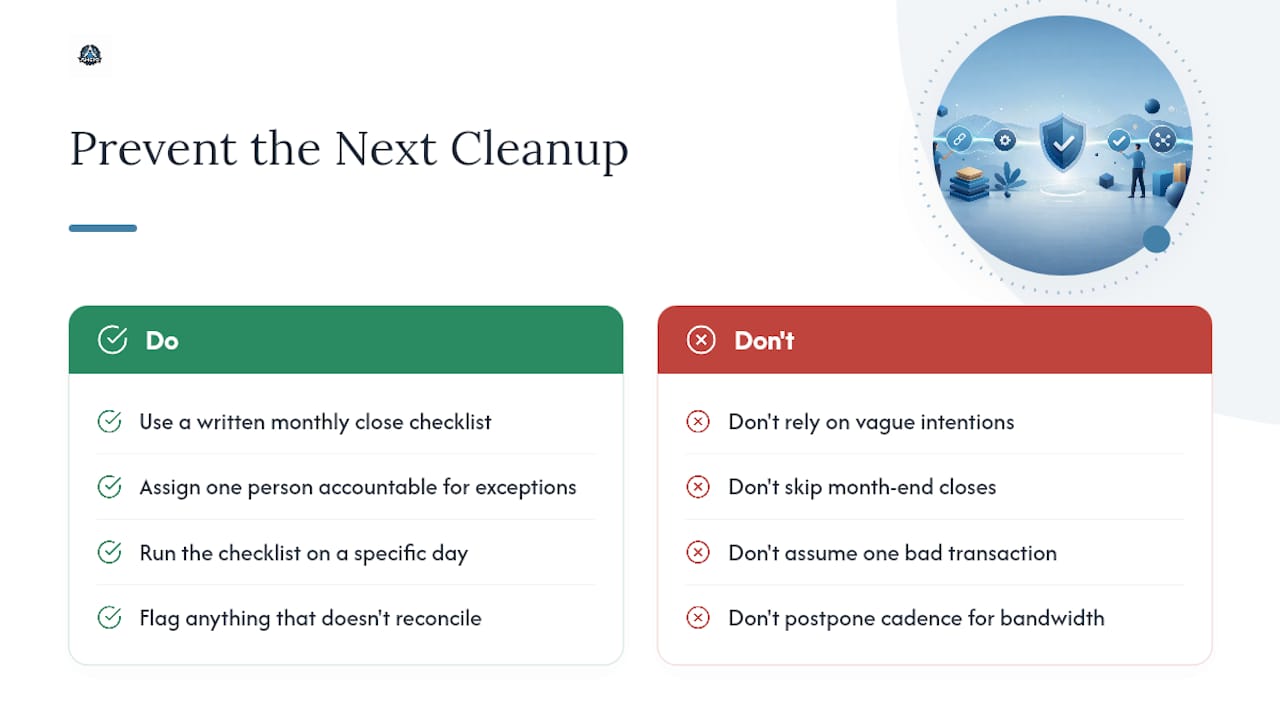
Most of the QuickBooks files I've seen weren't broken because of one bad transaction. They were broken because nobody closed the books, month after month, until eighteen months of small errors stacked into something unrecognizable. That's the pattern worth internalizing: cleanup isn't really a QuickBooks problem, it's a cadence problem.
The single highest-leverage habit is a written monthly close checklist with one person accountable for exceptions. Not a vague intention to "check the books sometime," but a specific list run on a specific day, with a place to flag anything that doesn't reconcile. If you don't have the internal bandwidth to run that cadence reliably, that's a legitimate reason to bring in a retained partner rather than a sign you've failed at bookkeeping.
— Angelica
Get a QuickBooks Cleanup Quote From Amcfo
Every cleanup project should start with a short diagnostic to get a real price instead of a guess. That diagnostic looks at how many months are unreconciled, transaction volume, and whether payroll or inventory adds complexity, then produces a fixed quote or hourly estimate along with a clear list of deliverables.

Cleanup engagements typically wrap with reconciled accounts, a documented Chart of Accounts, and exported final reports, plus the option to move into ongoing bookkeeping and accounting support so the mess doesn't rebuild itself in six months. If your books involve complicated loan structures or need broader financial planning once they're clean, that's part of the conversation too. Before reaching out, gather your last 12 months of bank statements and QuickBooks login access. The provider will take it from there and send back a scoped quote, not a guess.
Official QuickBooks Resources Worth Bookmarking
For hands-on troubleshooting, keep these official pages handy: QuickBooks File Doctor for file and network errors, Verify and Rebuild Data for integrity issues, the Condense Data utility for file size problems, and QuickBooks' 12-step cleanup guide for the baseline sequence this article builds on. If duplicate feeds trace back to a third-party operations tool, a resource like JobOS Pro's guide to software consolidation is worth a look for cutting off the problem at the source.
Sources
- Fix company file and network issues with QuickBooks File Doctor
- Verify and rebuild data in QuickBooks Desktop
- Use the Condense Data utility
- 12 steps for bookkeeping cleanup (and free checklist)
- How to Clean Up QuickBooks Online: The 12-Step Process I Used on 200+ Client Files – LedgerClean