

The accounts payable process is how a business tracks, verifies, and pays what it owes vendors. It runs through purchase requisition and PO creation, goods receipt, invoice receipt, capture and validation, GL coding, matching, approval routing, payment execution, and reconciliation. The goal at every step is simple: pay the right vendor the right amount at the right time, with a clean audit trail behind it.
TL;DR:
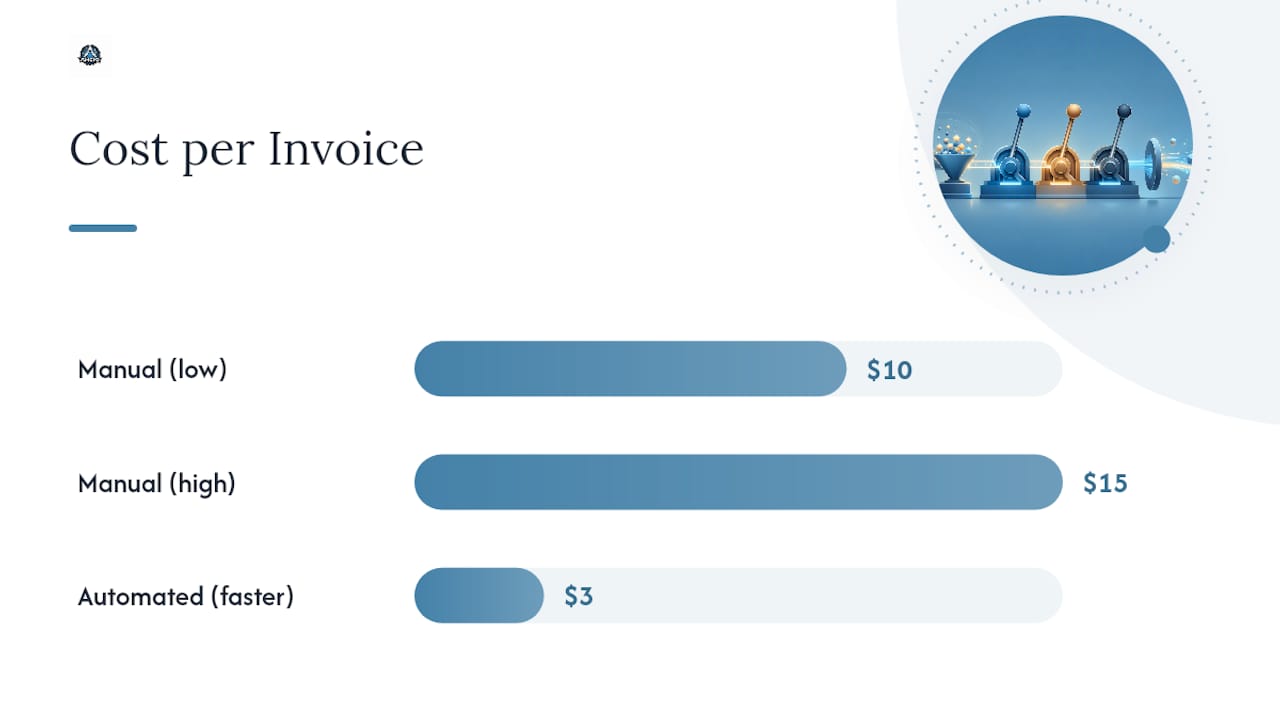
- Automating invoice capture and matching can reduce processing costs from $10-15 per invoice to around $3 for top performers.
- Establishing clear ownership and backup approval policies minimizes delays and prevents duplicate payments or lost invoices.
- Implementing strict vendor master file reviews and approved PO requirements above set thresholds reduces exception rates and improves controls.
- Setting appropriate matching tolerances based on invoice risk mitigates false alerts and streamlines exception handling.
Table of Contents
- Why the Accounts Payable Workflow Matters Beyond Bookkeeping
- The Full Accounts Payable Process Flow, Step by Step
- Matching Rules and Controls That Actually Stop Losses
- Where AP Automation Actually Pays Off
- The AP KPIs Worth Tracking Every Month
- Fixing the AP Bottlenecks That Cost You Time and Money
- Who Owns Each Step in the AP Cycle
- When AP Problems Signal It's Time for Outside Help
- What Thirty, Sixty, and Ninety Days of AP Discipline Looks Like
- How Amcfo Helps You Fix a Broken AP Process
- Where to Go Deeper on AP Benchmarks and Process Design
- Sources
Why the Accounts Payable Workflow Matters Beyond Bookkeeping
Accounts payable is a short-term liability on your balance sheet, but treating it as pure bookkeeping misses the point. Every unpaid invoice is money you still control. How and when you release it shapes your cash position, your leverage with vendors, and how clean your books look when an auditor or lender starts asking questions.
A well-run AP process pulls three levers at once:
- Cash flow control — delaying payment (within terms) preserves working capital; paying early captures discounts when the math favors it
- Vendor relationships — consistent, on-time payment keeps supply lines open and often earns better terms over time
- Audit readiness — a documented trail from purchase order to payment protects you when questions come up, internally or externally
The mistake most growing companies make is treating AP as a clerical task, something bookkeepers handle in the background. It's actually a control system. Every invoice that flows through it either confirms your spending discipline or exposes a gap in it. Businesses that connect cash flow management practices directly to their AP timing make far better decisions about when to pay and when to hold.
The Full Accounts Payable Process Flow, Step by Step
The canonical accounts payable process flow runs through seven core stages, with two upstream steps that determine how smoothly the rest goes. Corpay's breakdown of the seven-step structure and Xero's small-business guide both describe the same backbone, just with different emphasis depending on company size.
- Purchase requisition and PO creation. Require a purchase order for any recurring vendor spend or purchase above a set dollar threshold. A PO should capture vendor, item description, quantity, unit price, GL account, and approver. Skipping this step for "small" purchases is the single biggest source of matching exceptions later.
- Goods or services receipt. Whoever receives the shipment or confirms the service logs a goods receipt note (GRN) with quantity and condition. Timing matters here. A late-logged GRN stalls the invoice behind it even when everything else checks out.
- Invoice receipt. Centralize intake into one inbox or portal, never a mix of email, mail, and vendor portals. Log the vendor, invoice number, date, and amount immediately so nothing sits untracked.
- Capture and validation. AI-powered OCR tools now read line-item data off scanned or emailed invoices with high accuracy, but every system still needs a duplicate-invoice check and a vendor master lookup before that data moves forward.
- GL coding. Recurring vendors can be auto-coded based on history; new vendors or unusual line items need a human to assign the correct account and cost center. Flag anything the system can't code with confidence for manual review instead of guessing.
- Matching. The invoice gets checked against the PO and, where applicable, the goods receipt. This is where most exceptions surface, and it deserves its own section below.
- Approval routing. Invoices route to the right approver based on dollar thresholds and department. Delegation rules need to exist for when the primary approver is out, or invoices stall for days.
- Payment scheduling and execution. Payments go out via ACH, check, virtual card, or wire, timed to hit terms exactly, capturing early-payment discounts like 2/10 net 30 when the discount beats your cost of capital.
- Reconciliation and GL posting. Match the payment against the invoice and PO one final time, post to the general ledger, and archive the full document trail.
Pro Tip: Set your matching tolerance before you automate anything. A $2 variance on a $500 invoice shouldn't trigger a manual review, but a $200 variance should. Tolerances that are too tight create exception overload; tolerances that are too loose let errors slip through.
Reconciliation closes the loop, but it only works if every prior step left a clean record. A reconciliation process built on incomplete data upstream just moves the mess to month end instead of fixing it.
Matching Rules and Controls That Actually Stop Losses
Matching is the control point where AP either catches a problem or lets it through. Two-way matching (invoice against PO) works fine for services or low-risk recurring spend where quantity discrepancies aren't a concern. Three-way matching (invoice, PO, and goods receipt) is the standard for physical goods, because it confirms you actually received what you're being billed for, a check described as the baseline for goods purchases by Customerexperience. Four-way matching adds an inspection or quality report, useful for regulated industries or high-value equipment where a damaged or wrong item can't just get flagged after the fact.
Segregation of duties matters even on small teams. The person who requests a purchase shouldn't be the one who approves payment on it, and whoever enters vendor bank details shouldn't be the same person who releases the payment.
- On a two-person AP team, split invoice entry and payment release between two people, and have a manager spot-check a sample each month as a compensating control
- Verify any vendor bank detail change through a callback to a known contact number, never through the email requesting the change
- Review your vendor master file quarterly for duplicate records, inactive vendors, and unverified banking data
Exception handling needs the same rigor as the happy path. Give every exception an owner, a 48-hour timebox, and a defined escalation point if it isn't resolved. Unassigned exceptions are how duplicate payments happen. APQC's benchmarking data shows that top-performing AP teams resolve the overwhelming majority of exceptions without ever escalating past a first-line reviewer, largely because their tolerance rules and vendor data are clean enough to prevent most exceptions from happening in the first place.
Where AP Automation Actually Pays Off
Automation in accounts payable involves multiple integrated tools such as AI-OCR for capture, rules-based matching, workflow software for approvals, and integrated payment execution. Hyland's overview of the AP process frames this bundle as the standard automation architecture, and it's a useful way to think about where to invest first.
The highest-value automation targets aren't glamorous:
- Touchless processing for clean two-way matches, where the invoice, PO, and amount line up with no human touch needed
- Auto-coding for recurring vendors based on historical GL assignment
- Automated exception routing that sends only the genuinely unusual invoices to a human
- Payment-rail selection logic that defaults to ACH or virtual card over paper checks for cost and speed
Auto-coding shifts staff time away from data entry and toward exception review, which is a better use of a trained AP professional's judgment than typing invoice numbers.
The gap between manual and automated AP is larger than most finance leaders expect. Benchmarks compiled by Amazon Business show manual teams commonly spending $10 to $15 per invoice, while automated top performers approach roughly $3 per invoice with far shorter cycle times. That gap compounds fast once invoice volume climbs past a few hundred per month.
Integration with your ERP and procurement system determines whether automation actually reduces work or just adds a second system to reconcile against. If AP software doesn't sync PO data and vendor master records in real time with your general ledger, you've built a second spreadsheet, not a solution; this is a key benefit explained in integrated payroll solutions that streamline financial processes.
The AP KPIs Worth Tracking Every Month
You can't improve what you don't measure, and accounts payable has a well-established set of benchmarks worth watching:
- Cost per invoice — total AP overhead divided by invoice volume; manual processes run $10 to $15, automated top performers near $3
- Invoice cycle time — days from receipt to payment posting
- Touchless processing rate — percentage of invoices that clear with zero manual intervention
- Early payment discount capture rate — percentage of available discounts actually taken
- Invoice error rate — percentage requiring correction after initial entry
- Invoices processed per FTE — a volume and efficiency indicator
- Days payable outstanding (DPO) — average days taken to pay vendors
APQC's open-standards benchmarking gives finance teams a real yardstick instead of guessing at what "good" looks like. Pick two or three KPIs to focus on each quarter rather than tracking all seven at once. Cost per invoice and touchless rate together tell you almost everything about where automation is helping and where it isn't.
Fixing the AP Bottlenecks That Cost You Time and Money
Most AP headaches trace back to a handful of repeat offenders: invoices missing a PO reference, goods receipts logged late or not at all, invoices scattered across email inboxes and physical mail, approvals stuck behind one person's calendar, and duplicate payments slipping through when vendor names don't match exactly across records.
Fix these in order of effort versus payoff:
- Centralize invoice intake immediately. One inbox, one portal, no exceptions. This alone eliminates the "I never got that invoice" excuse.
- Make POs mandatory above a set dollar threshold. Even $500 as a cutoff forces better upstream discipline.
- Assign backup approvers for every threshold. No invoice should wait more than 48 hours because someone's on vacation.
- Set matching tolerances that reflect real risk, not zero-tolerance rules that flag every rounding difference.
- Clean the vendor master file to eliminate duplicate vendor records, the most common cause of duplicate payments.
- Roll out automation for your highest-volume, lowest-complexity invoice category first, then expand once the exception rate proves manageable.
Pro Tip: Run a duplicate-payment audit on your last twelve months of AP data before you fix anything else. Most companies find at least one live duplicate sitting in their history, and finding it yourself beats an auditor finding it for you.
The bigger structural fixes, vendor master cleanup, full automation rollout, and policy redesign, take longer, but they're what actually change your KPI trajectory rather than just patching this month's fire drill. A business process optimization review can help sequence these projects so you're not tackling all three at once.
Who Owns Each Step in the AP Cycle
Clear ownership prevents the finger-pointing that happens when an invoice sits unpaid for three weeks. Procurement owns the PO. Receiving owns the goods receipt. AP owns invoice capture, matching, and payment execution. Department managers own approval within their thresholds. Treasury owns payment timing and cash positioning.
- Set approval limits by dollar amount and role, not by individual name, so the rule survives staff turnover
- Name a backup approver for every threshold tier, with automatic reassignment after 48 hours of inactivity
- Retain invoice, PO, receipt, and payment records for at least the period your tax jurisdiction and any SOX-related audit requirements demand
- Review the full approval matrix at least once a year as headcount and spend levels change
When AP Problems Signal It's Time for Outside Help
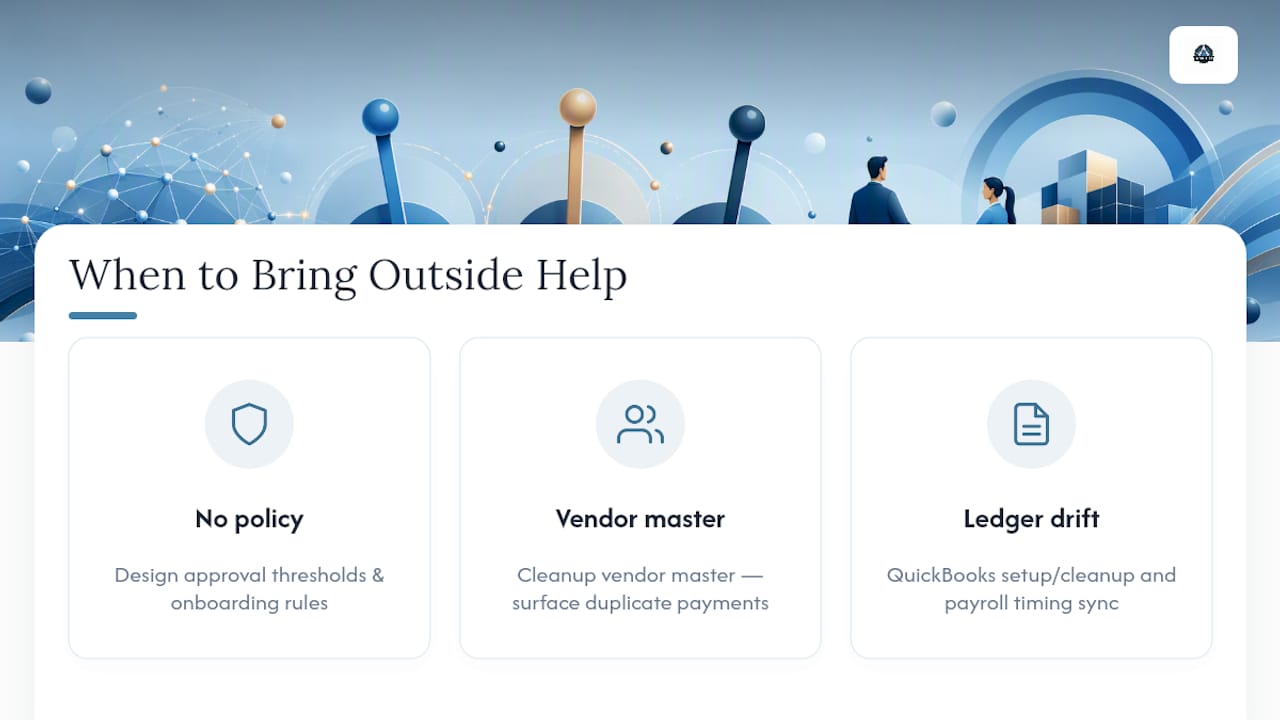
Some AP problems are process fixes. Others signal a deeper gap: no documented policy, a vendor master nobody's cleaned in years, or a QuickBooks file that doesn't reflect what's actually owed. That's usually where a fractional CFO or outsourced bookkeeping engagement pays for itself.
Amcfo works with businesses on exactly these gaps: QuickBooks setup and cleanup when the ledger and AP records have drifted apart, payroll support when AP and payroll timing need to sync, and policy design when approval thresholds and vendor onboarding rules don't exist yet. A short engagement focused on vendor master cleanup or approval policy design often surfaces duplicate payments or control gaps a busy internal team has missed for years.
What Thirty, Sixty, and Ninety Days of AP Discipline Looks Like
If you take one thing from this, prioritize centralizing intake and naming backup approvers in the first thirty days. It's the cheapest fix with the biggest immediate payoff. By day sixty, enforce PO-mandatory rules for defined spend categories and set matching tolerances that reflect actual risk. By day ninety, pilot automation on your cleanest invoice category and track cost per invoice and cycle time before and after. Everything else follows from getting those three right.
— Angelica
How Amcfo Helps You Fix a Broken AP Process
Amcfo is the alternative to hiring a full-time controller before you're ready for one. If your accounts payable process is stuck in spreadsheets, email chains, and a QuickBooks file nobody trusts, that's a bookkeeping and systems problem, not a headcount problem, and it's fixable in weeks, not quarters.

Amcfo's accounting and bookkeeping services handle the cleanup work: reconciling vendor records, fixing QuickBooks setup issues, and building the intake and approval structure your team needs to stop losing invoices. For businesses that need ongoing oversight rather than a one-time fix, fractional CFO services bring policy design, KPI tracking, and cash flow forecasting into one engagement. If you suspect duplicate payments or vendor fraud in your history, a forensic accounting review can find it. Start with a conversation about where your AP process is breaking down, and Amcfo will map out exactly what a cleanup or ongoing engagement looks like for your business.
Where to Go Deeper on AP Benchmarks and Process Design
- APQC's AP benchmarking collection for cost-per-invoice and cycle-time standards
- Corpay's AP process guide for the seven-step canonical framework
- Celonis's AP objectives and KPI breakdown for metric selection
- Freehand for role mapping and exception design
Sources
- Accounts payable key benchmarks — APQC
- Accounts Payable Process: Steps, Best Practices & Automation | Corpay
- What is the Accounts Payable Process? — Hyland
- Full-cycle accounts payable process: Steps and KPIs — Amazon Business blog
- Accounts payable process: a complete guide for small businesses | Xero US