

Yes. If even one employee works from a different state than your headquarters, you generally must register, withhold, and file payroll taxes in that state too. Withholding follows the state where the work happens, not where your business is based. A single remote hire can create nexus, so identify each employee's actual work state now and register before your next payroll run.
TL;DR:
- Register in a new state before processing payroll to avoid penalties and back filings caused by employee work location changes.
- Track employee work locations accurately using integrated time systems, especially when employees split time across multiple states.
- Withhold income tax based on where employees perform their work, except when reciprocity or convenience rules apply, which can alter withholding obligations.
- Manage multiple unemployment insurance accounts separately, monitoring each state's wage base and rates to ensure accurate SUTA reporting.
- Most errors stem from delayed updates about employee relocations or remote work status, making proactive documentation and process fixes essential.
Table of Contents
- What Is Multi-State Payroll and When Does It Apply?
- How Do You Determine Nexus and Register in a New State?
- How Does State Income Tax Withholding Work Across State Lines?
- Where Do You Pay SUTA for Employees in Multiple States?
- Which Wage and Hour Rules Apply by Employee Location?
- How Do You Track Work Locations and Sync Time Systems With Payroll?
- What's the Fix When Multi-State Payroll Goes Wrong?
- AmCFO's Role in Getting Multi-State Payroll Right
- What Employers Consistently Get Wrong About Multi-State Payroll
- Ready to Get Your Multi-State Payroll Under Control?
- Official Resources for Multi-State Payroll Rules
- Sources
What Is Multi-State Payroll and When Does It Apply?
Multi-state payroll is what happens the moment your workforce crosses a state line, whether that's one remote employee in Arizona while you're headquartered in California, or a sales team that lives in one state and reports to an office in another. It forces you to track several concepts at once: the work state (where the job is physically performed), the residence state (where the employee lives), nexus (the connection that obligates your business to register and pay taxes in a state), and reciprocity (agreements between neighboring states that let residents avoid double withholding).
A handful of common situations trigger these obligations:
- A fully remote hire who never sets foot in your home office
- An employee who relocates mid-year and doesn't tell payroll for three pay cycles
- Hybrid staff who split their week between a home state and an office state
- Sales or field employees who travel and rack up workdays in several states
- Seasonal or project-based workers assigned to a job site outside your registered states
Getting the classification right matters because it determines which state gets your withholding deposits, which unemployment agency needs your quarterly wage reports, and which local wage ordinances apply to that specific paycheck.
How Do You Determine Nexus and Register in a New State?
Nexus for payroll purposes is usually simpler than income tax nexus for the business itself. Having even one W-2 employee physically working in a state is often enough to require registration for withholding and unemployment insurance, regardless of whether you have an office, inventory, or sales there. Paycor's guidance on multi-state payroll confirms that a single remote employee can create nexus, and states expect you to register even without a physical location.
Once you know a state applies, work through this sequence:
- Confirm the employee's actual work state using their address and where they log hours.
- Register with that state's department of revenue for income tax withholding.
- Register with the state's unemployment agency for a SUTA account number.
- Check if you need a registered agent or foreign qualification to do business there.
- Update your payroll system with the new state's withholding tables before the next pay run.
Pro Tip: Register before you run payroll in a new state, not after. Retroactive registrations often trigger back filings, penalty notices, and phone calls with agencies that are far less forgiving once money has already moved.
Our guide on payroll tax liability for employers breaks down exactly what registration entails state by state if you want more detail on the paperwork itself.
How Does State Income Tax Withholding Work Across State Lines?
The default rule is straightforward: withhold state income tax based on where the employee physically performs the work, not where your company is headquartered or where the employee happens to live. That principle holds for the vast majority of payroll situations, according to Payroll.
Two wrinkles complicate that default:
- Reciprocity agreements. Some neighboring states let residents work across the border without double withholding, but only if the employee files an exemption certificate with your payroll department. Without that form on file, you're required to withhold for the work state regardless of where they live.
- Convenience-of-the-employer rules. A few states, New York being the best known example, tax remote employees based on the employer's location if the employee is working remotely for their own convenience rather than a genuine business requirement.
Nine states skip income tax withholding entirely: Alaska, Florida, Nevada, New Hampshire, South Dakota, Tennessee, Texas, Washington, and Wyoming, which matters if your workforce happens to cluster in any of them.
When an employee splits time between two states in the same week, apportion wages using actual time records rather than guessing at a percentage. Documenting the business reason behind a remote arrangement (client demand, cost savings, no available office) also helps if a state ever challenges your position under a convenience rule.
Where Do You Pay SUTA for Employees in Multiple States?
State unemployment insurance almost always follows the work location, the same logic that governs income tax withholding. Each state sets its own wage base, tax rate, and experience-rating formula, so an employer with staff in five states is effectively managing five separate unemployment tax profiles at once.
That creates real administrative friction if you're not organized. A few practices keep it manageable:
- Keep one master file with every state's SUTA account number, rate notice, and filing deadline.
- Review annual rate notices as soon as they arrive. Rates shift based on your claims history and can change without much warning.
- Reconcile SUTA wage bases quarterly against your payroll register, since wage bases differ by state and are easy to miscalculate.
- Flag any employee who changes work states mid-year for a SUTA account transfer, not just a withholding update.
OnPay's primer on multi-state payroll notes that experience-rating differences between states mean two employees earning identical wages can generate very different unemployment tax costs depending on where they clock in.
Which Wage and Hour Rules Apply by Employee Location?
Minimum wage, overtime, pay frequency, and paid leave rules are set at the federal, state, and sometimes city level, and the rule that favors the employee wins. Federal minimum wage sits at $7.25 an hour, but that number is close to meaningless in a lot of places. New York City's minimum wage climbs to $17.00 in 2026, and several other cities set their own floors above their state minimum.
Local rules that commonly reshape payroll calculations include:
- City or county minimum wages that exceed the state rate
- Mandatory paid sick leave accrual tied to hours worked in that jurisdiction
- Local payroll or transit taxes that apply on top of state withholding
- Pay frequency laws that require weekly or semimonthly pay in some states, regardless of your standard cycle
Before onboarding anyone in a new location, check that jurisdiction's minimum wage, overtime threshold, and pay frequency rule against what your payroll system currently applies by default.
How Do You Track Work Locations and Sync Time Systems With Payroll?
Getting withholding right depends entirely on knowing where work actually happened, not where an employee's mailing address says they live. That means collecting primary work location at hire, logging split-state hours when employees travel or work hybrid schedules, and getting a written remote-work declaration on file for anyone working outside your main office state.
The strongest control here is integrating your time and attendance system directly with payroll, so hours by location flow automatically into tax calculations instead of relying on manual spreadsheets. OnPay's research on multi-state payroll processing points to this integration as a core defense against apportionment errors when employees split time across states.
Practical steps worth adopting:
- Require a location field on every timesheet entry for employees who travel
- Use geofencing or periodic self-attestations for remote staff whose location could shift
- Run a quarterly manual audit even if your system is automated. Automation catches routine cases, not every edge case.
Pro Tip: Automated payroll platforms handle the math well once they have accurate location data, but the data quality problem is still on you. A perfect tax calculation on a wrong work state is still wrong.
What's the Fix When Multi-State Payroll Goes Wrong?
The most frequent mistake, by a wide margin, is withholding based on the company's headquarters state instead of the employee's actual work state. It's an easy default to fall into and an expensive one to unwind, since it usually means the wrong state got money it wasn't owed while the right state got nothing.
Other recurring errors include missed state registrations discovered months after an employee started, and SUTA wages reported to the wrong state entirely.
When you find a mistake, work through it in order:
- Pin down the exact date the error started, since that determines your exposure window.
- Register retroactively in the correct state if you haven't already.
- File amended withholding and unemployment returns for every affected quarter.
- Issue corrected W-2s to any employee whose state withholding was wrong.
- Contact the state agency about penalty abatement or a voluntary disclosure program before they contact you.
Most states offer some form of voluntary disclosure agreement that reduces or waives penalties for employers who self-report before an audit finds the problem. Our payroll support guide for business owners walks through what a correction filing actually looks like in practice.
AmCFO's Role in Getting Multi-State Payroll Right
Amcfo handles the parts of multi-state payroll that eat up an HR team's week: registering new state withholding and SUTA accounts, reconciling wage reports across jurisdictions, and coordinating corrected filings when an error surfaces. Clients get their registrations documented, their QuickBooks payroll setup aligned with each state's requirements, and a clean paper trail for every filing.
That work sits alongside Amcfo's broader bookkeeping and payroll support services, so the payroll fix connects to the rest of a company's books instead of living in isolation. For businesses managing forensic-level payroll cleanups after a compliance gap, that same team handles the reconciliation work end to end.
What Employers Consistently Get Wrong About Multi-State Payroll
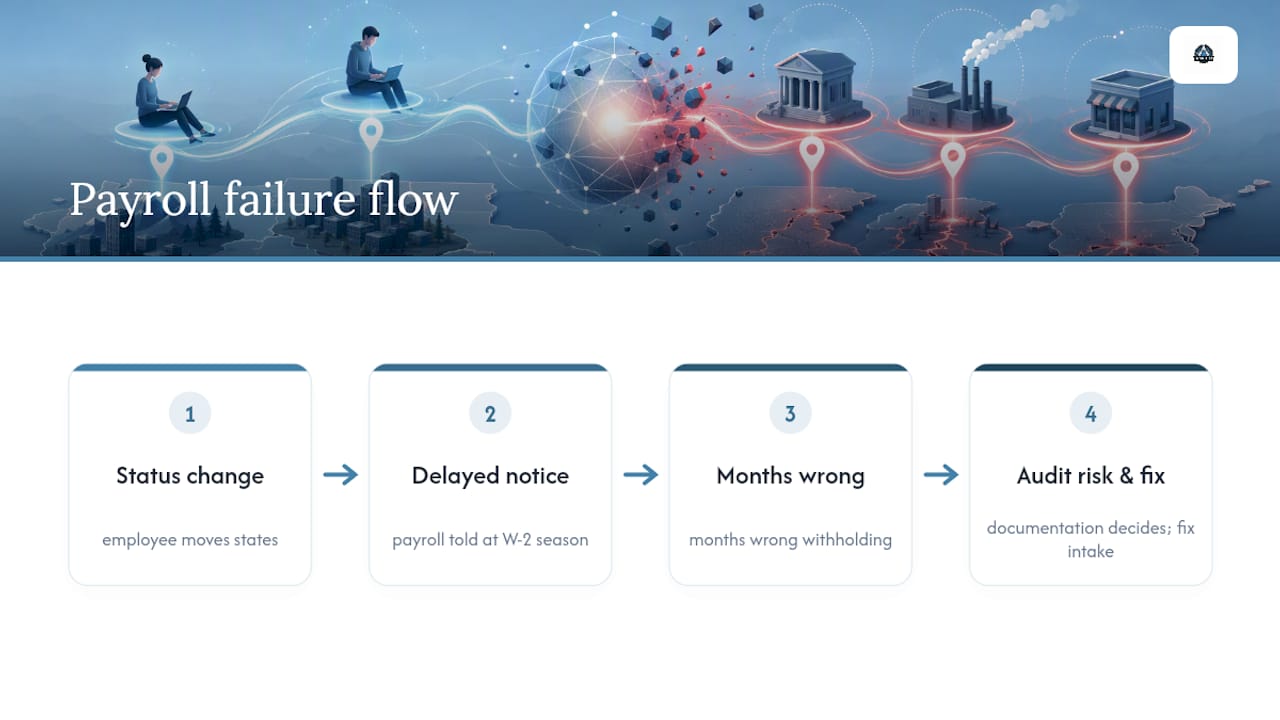
Most compliance guides treat multi-state payroll as a paperwork problem: register here, file there, done. That undersells it. The real risk isn't the registration itself, it's the gap between when an employee's situation changes and when payroll finds out about it. An employee moves states in March, mentions it to their manager in passing, and payroll doesn't hear about it until the next W-2 season. By then you're not fixing a form, you're unwinding months of wrong withholding.
The convenience-of-the-employer rule gets underrated for a different reason: it sounds like an edge case, but it's the one area where being fully compliant with the "withhold where the work happens" default can still leave you exposed if you're in a state like New York and can't document why the employee is remote in the first place. Documentation isn't a formality here. It's the thing that determines which side of an audit you land on.
If you take one thing from this guide, make it this: fix your intake process before you fix your filings. Every error downstream starts with payroll finding out too late.
— Angelica
Ready to Get Your Multi-State Payroll Under Control?
Amcfo works with business owners who'd rather hand off state registrations, withholding setup, and payroll management services than chase down agency notices themselves. Unlike a general payroll processor that hands you a login and leaves you to sort out reciprocity forms and SUTA transfers on your own, Amcfo's team scopes your specific state footprint and builds the registrations and QuickBooks setup around it.

Getting started is simple: a consult to map out which states your employees actually work in, a scoping call to identify what's missing (registrations, corrected filings, SUTA accounts), and delivery of the cleanup or ongoing payroll support your business needs. If you're not sure whether a remote hire or a recent relocation created a new filing obligation, start with a review of your accounting and bookkeeping needs and get a straight answer before your next pay run.
Official Resources for Multi-State Payroll Rules
For current forms and rate tables, check the IRS's guidance for tax professionals, your state's department of revenue, and your state unemployment agency's website directly.
This article is general information, not a substitute for advice from a qualified financial advisor. Consult a qualified financial professional about your own circumstances before acting on anything here.
Sources
- Payroll
- OnPay — Multi-state payroll primer
- Paycor — Multi-state payroll processing guide
- NYC Business — Wage regulations in New York State