

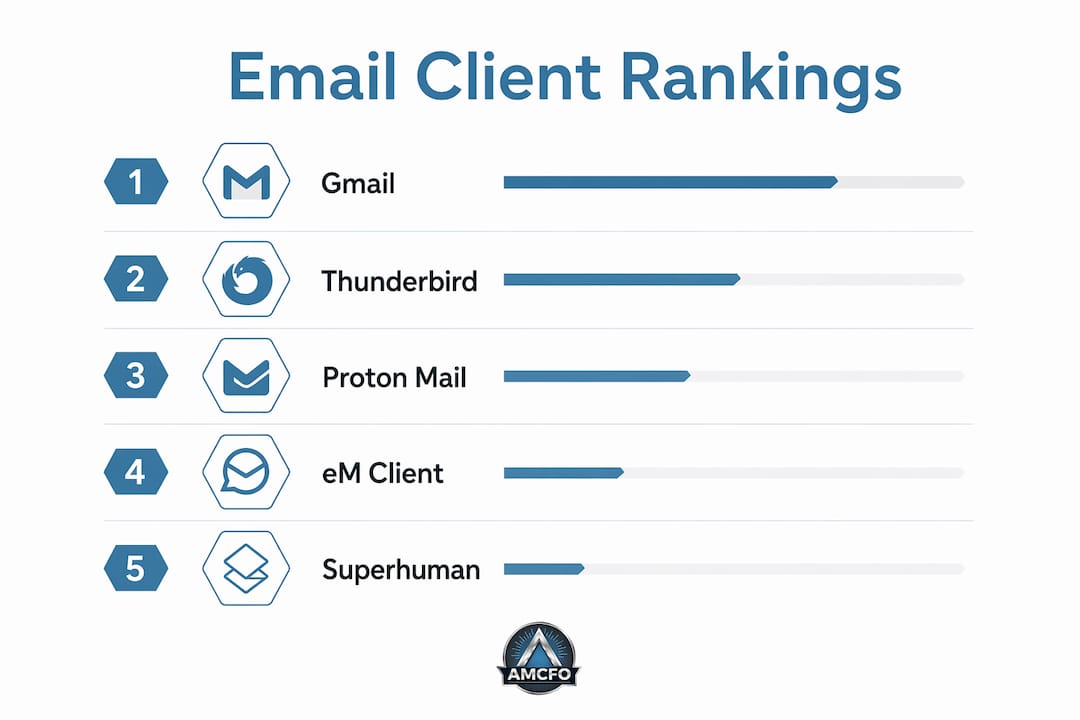
If you're looking for amoutlook.com alternatives, the short answer is that Gmail, Thunderbird, Proton Mail, and eM Client cover the vast majority of use cases for US professionals and individuals in 2026. The longer answer depends on whether you care more about speed, privacy, AI triage, or just getting away from the bloat of New Outlook's cloud proxy architecture.
One thing worth clarifying upfront: most users don't need to migrate their entire mailbox. Switching email clients is a low-risk move that changes your interface without touching your existing email service. That distinction matters because full migrations carry compliance risk and real cost, especially for Microsoft 365 users on Exchange.
The table below covers a wide range of featured alternatives across the dimensions that actually matter for US users.
| Product | Best For | Pricing | Platform Support | Privacy Features | AI Triage |
|---|---|---|---|---|---|
| Thunderbird | Free, open-source power users | Free | Windows, macOS, Linux | Direct server connection, no cloud proxy | No native AI |
| Gmail | Google Workspace users | Free / paid tiers | Web, Windows, macOS, iOS, Android | Google data practices | Yes (Gemini) |
| Apple Mail | Mac and iOS users | Free (built-in) | macOS, iOS | No third-party routing | Apple Intelligence |
| eM Client | Classic Outlook feel on Windows/Mac | Free / $49.95 one-time | Windows, macOS | Local storage option | Limited |
| Mailbird | Windows unified inbox | — | Windows | Direct server connection | No |
| Spike | Team chat-style email | Free / paid tiers | Windows, macOS, iOS, Android | Standard | Magic AI |
| Spark | Multi-inbox professionals | Free / $7.99/month | macOS, iOS, Windows, Android | Standard | AI reply drafts |
| Proton Mail | Maximum privacy | Free / $3.99/month | Web, iOS, Android, desktop bridge | End-to-end encryption, Swiss jurisdiction | No |
| Superhuman | Executive speed workflows | $30/month | Web, macOS, iOS, Android | Standard | Yes |
| Dove | Microsoft 365 AI triage | Paid (contact for pricing) | Web, Windows | Microsoft 365 native | Focus/Noise/Done AI |
| Zoho Mail | Small business custom domain | Free tier / paid tiers | Web, iOS, Android | S/MIME encryption | Zia AI (paid) |
| Mailspring | Free cross-platform basics | Free / $8/month Pro | Windows, macOS, Linux | Standard | No |
| Wimi | European compliance teams | Paid tiers | Web, Windows, macOS, iOS, Android | Sovereignty-focused | No |
| Infomaniak Mail | Swiss-hosted privacy | Paid tiers | Web, iOS, Android | Swiss hosting, privacy-first | No |
| Zimbra | Enterprise collaboration | Open-source / paid | Web, Windows, macOS, Linux, mobile | Configurable | Limited |
| Infraforge | Business privacy communication | Paid | Web, Windows | Secure, integrated | No |
| Mailforge | Fresh interface with integrations | Paid | Web, Windows, macOS | Standard | Yes |
| Primeforge | Privacy-first professionals | Paid | Web | End-to-end encryption | No |
| Maildoso | Email automation | Paid | Web | Standard | Rule-based |
| Zapmail | AI-powered inbox management | Paid | Web | Standard | Yes |
| Shift | Multi-account desktop management | Free / $149/year | Windows, macOS | Standard | No |
| Pegasus Mail | Legacy stability and security | Free | Windows | Mature security controls | No |
What sets each top alternative apart from Outlook
Thunderbird, Gmail, and the free tier leaders
Thunderbird remains the gold standard for free open-source email, supporting Windows, macOS, and Linux with a plugin ecosystem that rivals paid clients. You get unlimited accounts, strong privacy defaults, and direct server connections that never route your credentials through a third-party cloud. That last point matters more than it used to.
Gmail is the obvious counterpoint. If your team already lives in Google Workspace, switching to Gmail as your primary client costs nothing and gains you Gemini-powered inbox sorting, tight Calendar integration, and cross-device sync that just works. The tradeoff is that Google's data practices are the opposite of Proton's.

eM Client and Mailbird for Windows users who miss classic Outlook
eM Client is the closest thing to classic Outlook you can get without paying a Microsoft subscription. The free tier covers two accounts, and the one-time $49.95 license unlocks unlimited accounts, calendar, contacts, and tasks in a layout that will feel immediately familiar. It runs on both Windows and macOS, which is rare among Outlook-style clients.
Mailbird takes a different approach: it's lighter, faster, and built specifically for Windows users who want a unified inbox with integrations like Slack, Google Calendar, and WhatsApp baked in. Crucially, it connects directly to mail servers without cloud proxies, so your credentials stay on your machine.
Proton Mail and privacy-first options
Proton Mail operates under Swiss jurisdiction with zero-access encryption, meaning even Proton's own team cannot read your messages. For anyone in a regulated industry, healthcare, legal, or financial services, that architecture is genuinely different from what any US-based provider offers. The free tier is functional; the paid plan at $3.99/month adds custom domains and more storage.
Infomaniak Mail and Primeforge occupy similar territory for users who want European-hosted, privacy-first infrastructure. Wimi goes further by bundling email with project management in a sovereignty-focused suite, which explains its traction with compliance-heavy European teams. US users with international clients or GDPR obligations will find these worth a look.

Superhuman and Dove for high-volume professionals
Superhuman costs $30/month and earns it for executives who process email at volume. The keyboard-driven interface is genuinely fast, and the AI features prioritize speed over depth. It's the right call when your bottleneck is throughput, not privacy.
Dove is built specifically for Microsoft 365 inboxes and uses a Focus/Noise/Done triage model powered by native AI. If you're managing more than 80 emails a day inside an Exchange environment, Dove's approach of sorting before you ever open a message is worth the subscription cost. Spark offers a lighter version of this idea, with AI reply drafts and shared inbox features at $7.99/month, available across macOS, iOS, Windows, and Android.
Spike, Shift, and the multi-account crowd
Spike converts your inbox into a chat-style interface, which sounds gimmicky until you're on a team that sends 30 short back-and-forth emails a day. The Magic AI features handle drafting and summarizing. Shift takes the opposite approach: it doesn't change how email looks, it just lets you manage multiple Gmail, Outlook, and app accounts from one desktop window. At $149/year, it's a productivity tool for people who juggle five or more accounts.
Zoho Mail, Mailspring, and the budget-conscious
Zoho Mail's free tier supports up to five users with custom domain email, which makes it the default recommendation for small businesses that need professional addresses without the Microsoft 365 price tag. S/MIME encryption comes on paid tiers, and Zia AI handles basic sorting. Mailspring covers the individual use case: free, cross-platform (Windows, macOS, Linux), and clean enough for daily use, though it lacks the advanced encryption that Proton or Zoho's paid tiers provide.
Zimbra, Infraforge, Mailforge, Maildoso, Zapmail, and Pegasus Mail
Zimbra is the enterprise play: a full open-source collaboration suite with email, calendar, and tasks that organizations can self-host or run on a managed plan. It's not a consumer product, but for IT teams replacing Outlook at scale, it's one of the few options with comparable feature depth.
Infraforge and Mailforge both target business users who want integrated communication with privacy emphasis and productivity integrations respectively. Maildoso focuses on rule-based email automation, useful for professionals who want to route, tag, and respond to messages without manual sorting. Zapmail adds AI-powered inbox management for users who want the most current AI features without committing to Superhuman's price point.
Pegasus Mail deserves a mention for a specific audience: users who have run Windows email clients since the 1990s and value stability above everything else. It's free, mature, and secure, though its interface reflects its age.
Pro Tip: If you're currently on New Outlook and concerned about privacy, check whether your non-Microsoft accounts (Gmail, Yahoo, IMAP) are being routed through Microsoft's cloud proxy. Thunderbird or Mailbird will connect directly to those servers instead, keeping your credentials off Microsoft's infrastructure entirely.
How to choose the right Outlook alternative for your needs
The single most useful question to ask yourself is whether you need to change your email service or just your email client. Most Microsoft 365 users should change the client and leave the mailbox alone. Migrating an entire email service is expensive, carries compliance risk, and rarely solves the interface problems that drove the switch in the first place.
Once you've settled on client-only, four criteria narrow the field quickly.
Platform. Windows users have the widest selection: eM Client, Mailbird, Thunderbird, Spike, Shift, and Superhuman all run natively. Mac and iOS users are well served by Apple Mail, Spark, and eM Client. Linux users are largely limited to Thunderbird and Mailspring, though Zimbra covers enterprise Linux deployments.
Email volume. AI triage pays off when you're handling more than 80 messages a day. Below that threshold, a clean interface like Mailbird or eM Client is usually enough. Above it, Dove, Spark, or Superhuman will save you real time each week.
Privacy requirements. New Outlook routes non-Microsoft IMAP credentials through Microsoft's cloud proxy, which is a meaningful architectural difference from clients that connect directly to mail servers. If data sovereignty matters, Thunderbird, Mailbird, Proton Mail, or Infomaniak Mail all avoid that routing. For regulated industries, Proton Mail's zero-access encryption under Swiss law is the strongest option available.
Team collaboration. Solo users rarely need more than a clean client. Teams benefit from Spike's chat-style threading, Spark's shared inbox features, or Wimi's full collaboration suite. Zimbra handles this at enterprise scale.
A few other considerations worth keeping in mind:
- Archiving. Switching clients can put archived email at risk if you don't have a dedicated archiving solution in place. This is especially true for businesses with e-discovery or compliance obligations.
- Integration needs. Mailbird and Shift excel at connecting third-party apps. Zoho Mail integrates tightly with the broader Zoho suite. Gmail connects to every Google Workspace tool natively.
- Budget. Free options (Thunderbird, Gmail, Apple Mail, Mailspring, Zoho Mail's free tier, Pegasus Mail) cover most personal use cases. Professional needs usually justify $8–$30/month for Spark, Superhuman, or a paid Proton plan.
Pro Tip: If your primary concern is workflow automation alongside email, look at how each client handles rules and filters before committing. Maildoso and Zapmail both offer automation features that can replace manual sorting routines, while Spike and Spark handle team-facing workflows through shared inboxes and AI drafts.
Amcfo can help you align your business finances with the right tools
Choosing the right email client is one piece of a larger operational picture. For business owners and professionals, the bigger question is whether your financial reporting, cash flow visibility, and decision-making infrastructure are keeping pace with your workflow.
Amcfo provides accounting and bookkeeping services built for businesses that need more than a spreadsheet but aren't ready for a full-time CFO. From QuickBooks setup and payroll support to budgeting, forecasting, and fractional CFO consulting, Amcfo gives you the financial clarity to make confident decisions, whether you're evaluating software costs, managing vendor contracts, or planning for growth. If your business tools are getting sharper, your financial strategy should be too.
Key Takeaways
Gmail, Thunderbird, Proton Mail, and eM Client cover the most common US professional use cases in 2026, with the right choice depending on platform, privacy needs, email volume, and budget.
| Point | Details |
|---|---|
| Client vs. service migration | Changing your email client is low-risk; migrating your entire mailbox service is costly and complex. |
| Privacy architecture matters | New Outlook routes non-Microsoft IMAP accounts through Microsoft's cloud; Thunderbird and Mailbird connect directly to mail servers. |
| AI triage for high volume | AI-assisted sorting in Dove, Spark, and Superhuman pays off most for users handling more than 80 emails daily. |
| Free options are genuinely capable | Thunderbird, Gmail, Apple Mail, Mailspring, and Zoho Mail's free tier cover most personal and small-team needs at no cost. |
| Amcfo for business financial clarity | Amcfo's fractional CFO and bookkeeping services help businesses align financial strategy with the operational tools they use. |